

Key Takeaways
Why Shopping Scams Are Getting Harder to Spot
Modern phishing emails and smishing texts (SMS phishing) are not the clumsy, typo-ridden messages of a decade ago. Fraudsters now harvest real retailer logos, replicate transactional email layouts pixel-by-pixel, and even spoof sender names so the message appears to come from a legitimate store. For families who shop online regularly, the volume of real order confirmations, shipping updates, and account notices creates a noisy backdrop that scammers exploit effectively.
The core manipulation is simple: trigger a familiar emotional response — excitement about an order, anxiety about a delivery problem, or alarm about unauthorized account activity — and then offer an easy link to resolve it. That link is the trap. Understanding this pattern is the foundation of every defense strategy covered in this guide.
For a broader look at how consumer deceptions are structured, see common retail deceptions and how to counter them. And if you want to audit your full online shopping routine, the pre-purchase checklist for online shopping is a useful companion resource.
Fake Order Confirmations Are Especially Deceptive
During high-volume shopping periods, families may genuinely have multiple orders in transit, making a fake order confirmation easy to mistake for a real one. Scammers time these campaigns deliberately. If you receive an order confirmation for a purchase you don't recognize, do not click any link in the email — go directly to your account on the retailer's website to check your actual order history.
What You'll Need Before You Start
This guide walks you through a practical inspection process you can apply to any suspicious message. No technical expertise is required — just a few minutes and the items listed below.
What you will need
Step-by-Step: How to Evaluate a Suspicious Message
Follow these steps whenever you receive an unexpected order confirmation, delivery alert, or account warning. The goal is to verify before you act — not after.
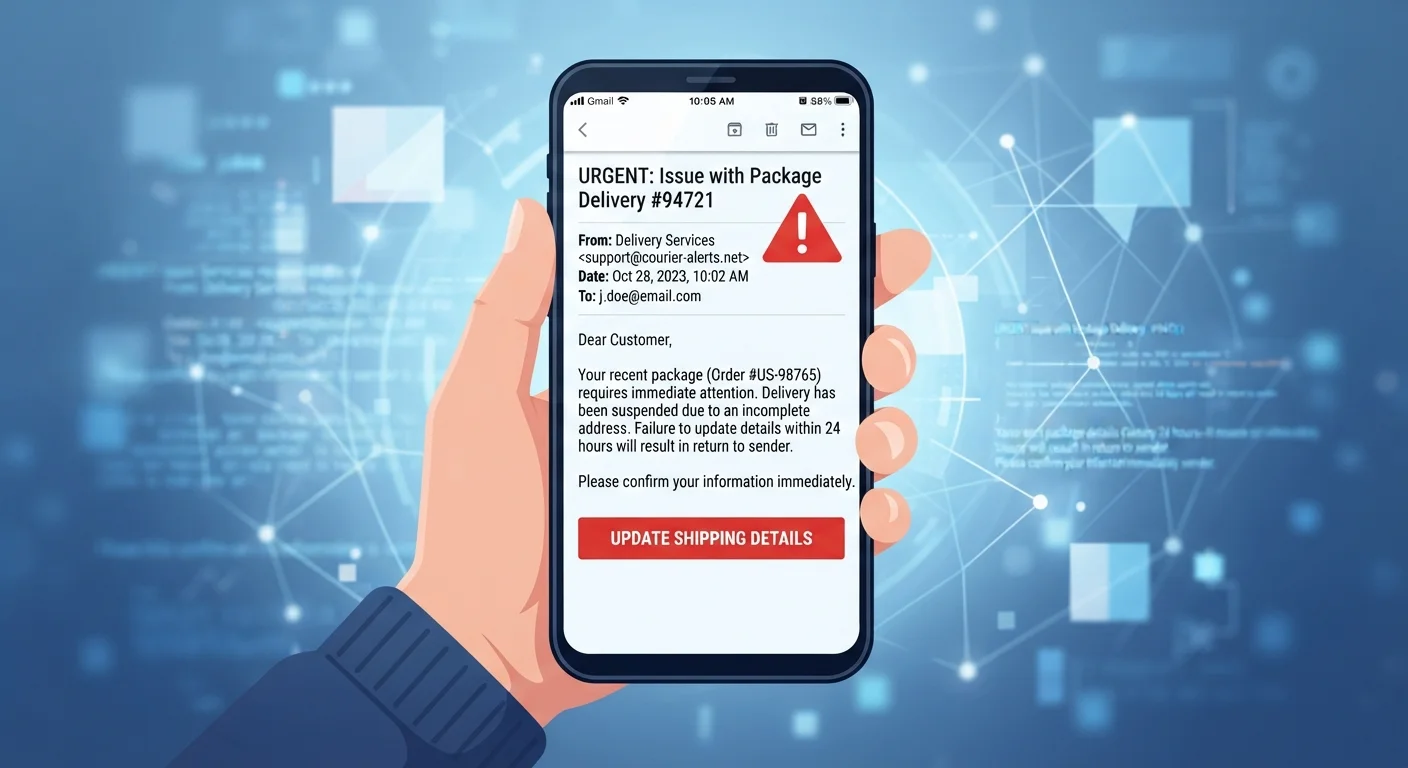
Check the sender address — not just the display name
Email clients show a friendly display name (e.g., "Amazon Customer Service") by default. Tap or hover to reveal the actual sending address. Legitimate retailer emails come from domains that match the retailer's official website exactly — for example, @amazon.com, not @amazon-support.net or @secure-amazon-orders.com.
Look for subtle misspellings, extra words, or entirely different domains disguised with brand keywords. A single transposed letter or an added hyphen is the most common tell.
Hover over links before clicking anything
On a desktop, hover your cursor over any link or button in the message without clicking. The actual destination URL appears in your browser's status bar or a tooltip. Compare that destination to the retailer's known domain. If the URL looks like a long string of random characters, points to an unrelated domain, or uses a URL-shortening service, do not click it.
On mobile, press and hold a link to preview the destination before opening it.
Assess the urgency and emotional framing
Scam messages almost always manufacture pressure: "Your package cannot be delivered — act within 24 hours," "Unusual activity detected — verify your account now," or "Your order is on hold pending payment confirmation." Legitimate retailers do send time-sensitive notices, but they do not threaten account closure or parcel destruction within hours of a single unread message.
If a message triggers a strong emotional reaction — alarm, excitement, fear of missing out — treat that reaction as a cue to slow down, not speed up.
Navigate directly to the retailer's site to verify
Open a new browser tab and type the retailer's official web address manually, or access it through a bookmark you created yourself. Log in to your account and check order history, account alerts, or delivery tracking directly. If the message was legitimate, the same information will appear in your account. If your account shows nothing — no order, no alert, no problem — the message was fabricated.
This single habit eliminates the vast majority of phishing risk regardless of how convincing the message looks.
Inspect the message body for structural inconsistencies
Even polished scam messages often contain subtle errors that a quick scan can catch: mismatched fonts, slightly off-color brand logos, generic greetings ("Dear Customer" instead of your name), inconsistent formatting between paragraphs, or placeholder text left from a copied template. Cross-reference the visual style against a real email you've received from the same retailer in the past.
For smishing texts, note that legitimate carriers and retailers rarely ask you to click a link to resolve a delivery issue — they typically provide a tracking number you can enter on the carrier's official site yourself.
Use a Dedicated Email Address for Shopping
Creating a separate email address exclusively for online retail accounts makes it easier to spot anomalies — any shopping-related message arriving at your primary address is immediately suspicious. It also limits the exposure of your main email to data breaches from retail sites.
After You've Identified a Scam
Recognizing a scam message is only half the job. What you do next matters for your own protection and for the broader consumer ecosystem.
Do not click, reply, or call back. Even engaging with a scam message — responding to ask for more information, or calling a spoofed phone number — can confirm your contact details as active, inviting further targeting.
Report it. In the US, you can forward phishing emails to the Anti-Phishing Working Group at reportphishing@apwg.org, and smishing texts to 7726 (SPAM) — a shortcode supported by most major carriers. The Federal Trade Commission also accepts reports at ReportFraud.ftc.gov. If the message impersonates a specific retailer, forwarding it to that retailer's security or abuse team helps them issue warnings to other customers.
Check your accounts proactively. If you interacted with a suspicious link before recognizing it as a scam, change your password immediately on the affected account and any other account sharing that credential. Enable multi-factor authentication if you haven't already, and review recent account activity for unauthorized transactions.
Scam literacy pairs well with a clear-eyed understanding of how marketing more broadly tries to influence purchasing decisions. The article on shopping myths that cost American families real money covers the subtler side of that picture. For peer-to-peer and marketplace-specific fraud, protecting your family from online marketplace fraud offers a dedicated framework.
This article is for general informational and educational purposes only. It does not constitute legal or financial advice. If you believe you have been a victim of fraud, contact your financial institution and relevant authorities promptly.